
Auto-convert on upload
Every image added to your WordPress media library is automatically converted to WebP in the background — no manual steps needed.

Reduce image size, improve performance, and keep full control with bulk processing, queue systems, and restore options, zero technical expertise required.
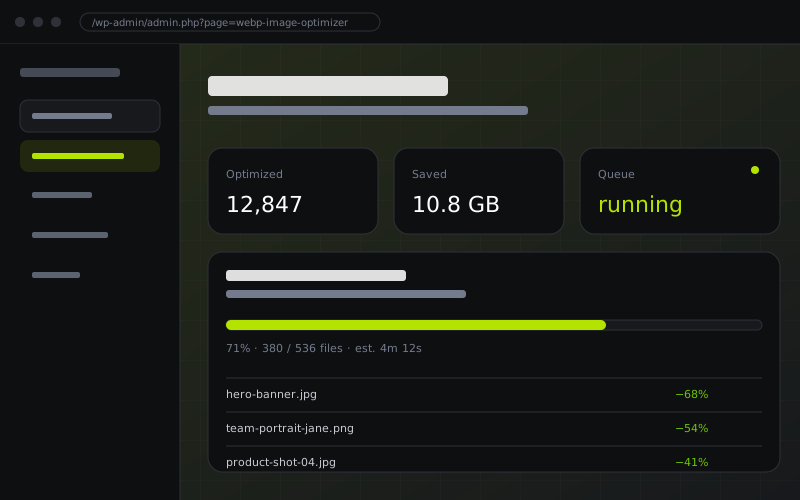
A complete toolkit for automatic WebP conversion from a single uploads to your entire media library.
Every image added to your WordPress media library is automatically converted to WebP in the background — no manual steps needed.
Convert your entire media library at once. Process thousands of existing JPG, PNG, and GIF files with a single click.
Smart queue system processes images in batches without overloading your server, even on shared hosting environments.
Never lose your originals. Every source file is preserved and can be fully restored to its original format at any time.
Serve WebP images to compatible browsers automatically, while falling back to originals for older browsers — seamlessly.
Fine-tune output quality and choose between GD and ImageMagick engines based on your server capabilities and preferences.
Automatically update image URLs in your database content to reference WebP versions, maximizing delivery performance.
Set maximum width limits to automatically scale down oversized images during conversion, saving even more storage.
Most clients won't say "your PageSpeed dropped." They say "the homepage feels slow." Same problem, image weight. Convert to WebP, and the conversation changes.
The homepage feels slow on mobile. Can we look at it?
client email · Monday, 9:14 AMWhatever you did, it feels great now. Thank you.
same client · Wednesday, 2:48 PMNote: Restore originals anytime, one click.
From upload to delivery, the entire process runs automatically in the background.
Add any JPG, PNG, or GIF to your WordPress media library. The plugin detects it instantly and queues it for conversion.
Images are converted immediately on upload, or added to a batch queue for server-safe processing, your choice.
A compressed WebP version is created alongside the original. The plugin serves WebP to supported browsers automatically via WP Hook.
Changed your mind? Restore individual images or your entire library to the original format in a single click, no data loss.
No lock-in, no credit card to start.
Install from WordPress.org. No account required.
DOWNLOAD FREEUnlimited sites.
GET PRO| Feature | Free | Pro |
|---|---|---|
| Auto-convert on image upload | ✓ | ✓ |
| Manual bulk conversion | ✓ | ✓ |
| GD / ImageMagick support | ✓ | ✓ |
| Queue-based bulk processing | ✓ | ✓ |
| Restore originals images | ✓ | ✓ |
| Bulk Restore originals images | — | ✓ |
| Advanced logs & monitoring | — | ✓ |
| Database URL replacement | — | ✓ |
| Large image scaling | — | ✓ |
| Image Comparison | — | ✓ |
| Image Type Filter | — | ✓ |
| WP Offload Media Support | — | ✓ |
| Support SVG Upload on WordPress Media | — | ✓ |
| Priority support | — | ✓ |
We went from 4.2s to 1.8s page load time after bulk-converting our entire media library. The queue system handled 3,000+ images without breaking a sweat on shared hosting. Absolutely brilliant plugin.
The restore feature gave me the confidence to actually use it on a production site. Knowing I could revert everything with one click removed all the risk. Converted 1,800 images, saved over 2 GB.
The auto-upload conversion means I never think about image optimization anymore. My PageSpeed scores jumped from 62 to 90. The activity logs and database URL replacement are exactly what a pro setup needs.
The plugin supports JPEG, PNG, and GIF input formats. All are converted to WebP. Thumbnails generated by WordPress are also converted automatically alongside the original.
Yes, absolutely. Original images are always preserved on the server. You can restore any individual image or bulk image restore to its original format at any time from the plugin dashboard.
Bulk Conversion scans all existing images in your WordPress media library and converts them to WebP format automatically. Images are processed in optimized batches to help maintain stable server performance, even on shared hosting environments.
Yes. The plugin supports both GD Library and ImageMagick engines. You can choose your preferred engine in the plugin settings, and the plugin automatically detects which is available on your server.
WebP is supported by over 96% of modern browsers, including Google Chrome, Mozilla Firefox, Microsoft Edge, and Safari. For older or unsupported browsers, the plugin automatically serves the original image format, ensuring visitors never see broken images or missing media.
This Pro feature scans your WordPress database and replaces image URLs in post content, metadata, and theme settings to point directly to the WebP versions — maximizing delivery speed even for hard-coded image paths.
The Pro version doesn’t impose a hard file size limit. The actual limit depends on your server settings — specifically your PHP upload_max_filesize, post_max_size, memory_limit, and max_execution_time values. If you need to process large images, you may need to increase these values in your php.ini or contact your hosting provider.
Your website remains fully live and operational during the conversion process. Images are processed in background batches without interrupting normal site traffic, so visitors continue to see images normally while optimized WebP versions are generated and served automatically.
Having an issue? Reach out to our team for quick assistance.